00:00
00:00
Newgrounds Background Image Theme

CapacitorCat just joined the crew!

We need you on the team, too.

Support Newgrounds and get tons of perks for just $2.99!

Create a Free Account and then..

Become a Supporter!

3 .fla files of the same cartoon all corrupted at the same time?

142 Views | 9 Replies
New Topic Respond to this Topic

Anyone had this problem? Multiple backups failing at the same time?


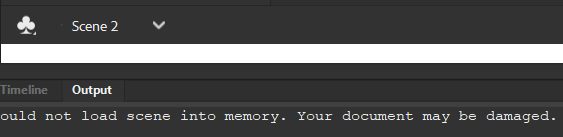
"Could not load scene into memory. Your document may be damaged."


It's weird because only one of them was left open when I turned my computer off, and 3 .fla files corrupting for no reason seems improbable. I've already tried all the Winrar repair stuff , I've uninstalled Animate and am re-installing a never version right now to see if that works, any other esoteric suggestions?

BBS Signature

At 11/12/25 11:15 PM, MetalSlayer69 wrote:I've uninstalled Animate and am re-installing a never version right now to see if that works


well that didn't do anything, two things I've noticed are:

1) The corrupted files default to Scene 2 which is empty and Scene 1 just doesn't exist on the dropdown menu

2) The corrupted files still have the same file size they had before they were corrupted. I've had files corrupt in a different way before where they took up 0 bytes


iu_1490889_7936681.png


BBS Signature

I'm pretty sure it's a memory insufficiency issue and not a file corruption due to the reasons listed above. But even with 3 entire available gigabytes of RAM it won't open. I dunno I'm just confused


BBS Signature

At 11/13/25 12:40 AM, MetalSlayer69 wrote:I'm pretty sure it's a memory insufficiency issue and not a file corruption due to the reasons listed above. But even with 3 entire available gigabytes of RAM it won't open. I dunno I'm just confused


If you post a link to the FLA I'll have a look.


Member of Flanimate Power Tools team - extensions for Flash character animation


At 11/13/25 01:19 AM, ntilcheff wrote:
At 11/13/25 12:40 AM, MetalSlayer69 wrote:I'm pretty sure it's a memory insufficiency issue and not a file corruption due to the reasons listed above. But even with 3 entire available gigabytes of RAM it won't open. I dunno I'm just confused

If you post a link to the FLA I'll have a look.


I saw a five year old post from you on the Adobe forum today haha. I'll DM you the file. Even if you can't get it to work I appreciate taking the time to help me out.


BBS Signature

pump that page file up!


new forum signature


At 11/13/25 01:30 AM, MetalSlayer69 wrote:I saw a five year old post from you on the Adobe forum today haha. I'll DM you the file. Even if you can't get it to work I appreciate taking the time to help me out.


Sadly, your file is irreparably damaged.


Member of Flanimate Power Tools team - extensions for Flash character animation


At 11/13/25 02:55 AM, Kolumbo wrote:pump that page file up!


This didn't work


At 11/13/25 03:38 AM, ntilcheff wrote:
At 11/13/25 01:30 AM, MetalSlayer69 wrote:I saw a five year old post from you on the Adobe forum today haha. I'll DM you the file. Even if you can't get it to work I appreciate taking the time to help me out.

Sadly, your file is irreparably damaged.


I mentioned I had 3 files, 2 of them are identical (same file size) and it was one of those two that I sent. I have a third that's saved a few hours before the others and has a slightly smaller file size.


My hopes are pretty low but for the sake of thoroughness I'd like it if you checked that one as well


BBS Signature

At 11/13/25 03:50 AM, MetalSlayer69 wrote:
At 11/13/25 02:55 AM, Kolumbo wrote:pump that page file up!

This didn't work
At 11/13/25 03:38 AM, ntilcheff wrote:
At 11/13/25 01:30 AM, MetalSlayer69 wrote:I saw a five year old post from you on the Adobe forum today haha. I'll DM you the file. Even if you can't get it to work I appreciate taking the time to help me out.


Sadly, your file is irreparably damaged.


I mentioned I had 3 files, 2 of them are identical (same file size) and it was one of those two that I sent. I have a third that's saved a few hours before the others and has a slightly smaller file size.

My hopes are pretty low but for the sake of thoroughness I'd like it if you checked that one as well


hmm, flash/animate is pretty wonky when it comes to memory. page file not helping is odd, though. there's something that you can do in preferences & publish settings but i can't remember exactly what it is at the moment. helped my ass with the windowz games, along with a HUGE page file, and I had this exact thing happen; file opens empty and the output says NO MEMORY FUCK YOU.


i'm sure your file can be saved somehow, i'll dig through my settings to see if anything jumps out and jogs my memory. will report back if something does.

as a last resort, you can always try decompiling an existing .swf of it to get a brand new file (although with fucked up layers and library names)


new forum signature


Off idea, maybe File History, if you're on windows?

I haven't used it but if i understand it, it could fish out an older version of the file, which may be usable.


Three different backups getting corrupted is very weird, if it's not a problem with the act of reading the file,

I would suspect hardware failure, or foul play.

In both case, I'd backup the drive, and try to implement periodic backups to another PC


I've also corrupted data when transferring large files to external drives a long time ago because I didn't understand how data transfer worked and disconnected before the cache was flushed to drive, so that may be it also.