00:00
00:00
Newgrounds Background Image Theme

CapacitorCat just joined the crew!

We need you on the team, too.

Support Newgrounds and get tons of perks for just $2.99!

Create a Free Account and then..

Become a Supporter!

Lookin for feedback on my animation

176 Views | 8 Replies
New Topic Respond to this Topic

Helloooo first time posting on the animation forum 🌈✨


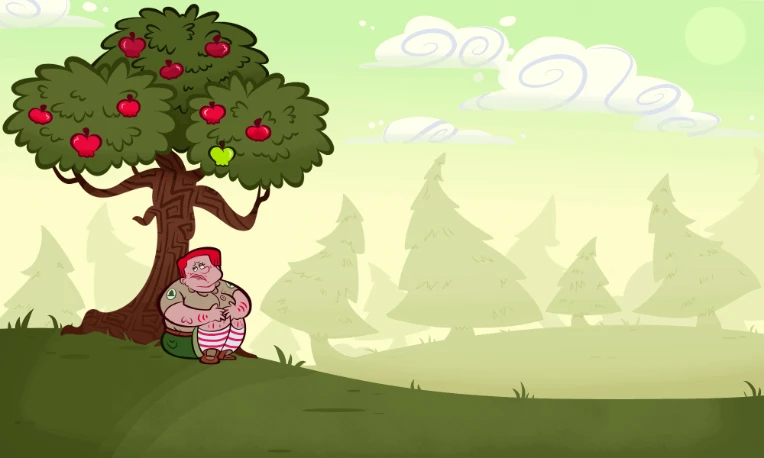
Im honestly still pretty new to animating frame by frame and im lookin for some advice on this snippet ive made

We were asked to do a sample test for college heres what i did:

iu_1489051_10412881.webp


For context, the drawings/assets were made in medibang, exported ,tweaked, and animated in fire alpaca, then re-paced in EZ-Gif


In other words...I dont got no time frames to work with lol, but Im trying with what ive got and the little bit i know about animating, Id like for my animation to look smooth n bouncy, is there anything I could do to improve this animation?


(visual pointers are appreciated)


I CAN BENCH MORE THAN YOU!!

BBS Signature

Response to Lookin for feedback on my animation 2025-11-08 20:03:09


(gifs on the forum don't play if the file size is too big)


BBS Signature

Response to Lookin for feedback on my animation 2025-11-09 03:33:20


At 11/8/25 08:03 PM, MetalSlayer69 wrote:(gifs on the forum don't play if the file size is too big)


ah shit, didnt know that, made this last thing before i went to bed ty for lettin me know how embarassing

lmao 😭


https://file.garden/ZeL1cD685jeI5jeR/%23-animations/ezgif.com-gif-to-mp4-converter.mp4


hopefully this link should be functional instead, can u see this movin?


I CAN BENCH MORE THAN YOU!!

BBS Signature

Response to Lookin for feedback on my animation 2025-11-09 03:49:21


At 11/9/25 03:33 AM, PsychoStatic12 wrote:
At 11/8/25 08:03 PM, MetalSlayer69 wrote:(gifs on the forum don't play if the file size is too big)

ah shit, didnt know that, made this last thing before i went to bed ty for lettin me know how embarassing
lmao 😭

https://file.garden/ZeL1cD685jeI5jeR/%23-animations/ezgif.com-gif-to-mp4-converter.mp4

hopefully this link should be functional instead, can u see this movin?


Yes ma'am.


Here's what I'd do differently:


Slow down the sigh at the beginning and the head scratch. 


Make the apple accelerate slower as it rolls down the hill, and make the bounce on the ground go higher. 


make the character less static, like the whole head (at least) should move with the surprised take at the end, and I might even go so far as to have her re-adjust her legs during movements. 


For a shot like this I might even pull the camera back further, smaller character = less frames required to look good. 


BBS Signature

Response to Lookin for feedback on my animation 2025-11-09 08:48:57


At 11/9/25 03:49 AM, MetalSlayer69 wrote:
At 11/9/25 03:33 AM, PsychoStatic12 wrote:
At 11/8/25 08:03 PM, MetalSlayer69 wrote:(gifs on the forum don't play if the file size is too big)

ah shit, didnt know that, made this last thing before i went to bed ty for lettin me know how embarassing
lmao 😭

https://file.garden/ZeL1cD685jeI5jeR/%23-animations/ezgif.com-gif-to-mp4-converter.mp4

hopefully this link should be functional instead, can u see this movin?

Yes ma'am.

Here's what I'd do differently:

Slow down the sigh at the beginning and the head scratch.

Make the apple accelerate slower as it rolls down the hill, and make the bounce on the ground go higher.

make the character less static, like the whole head (at least) should move with the surprised take at the end, and I might even go so far as to have her re-adjust her legs during movements.

For a shot like this I might even pull the camera back further, smaller character = less frames required to look good.


Hello im back again

made a few tweaks, mainly focusing on the pacing more than anything, considered moving the legs, ive got a wip of that but i havent implimented it yet


I honestly completley forgot to add anything for the suprise at the end, i added some stretch n enlargement n that part looks much better imo


but the rest of it?? unsure, the apple rolling is the part im unsure about now, i like the bounce, but idk if the pacing is any better.

https://file.garden/ZeL1cD685jeI5jeR/-junk/take%202.mp4 heres the 2nd take


if anyone else would like to jump in on this too please feel free lol every little helps


I CAN BENCH MORE THAN YOU!!

BBS Signature

Response to Lookin for feedback on my animation 2025-11-09 12:42:46


I'll give you a few tips.


Bring the scene to life. Sometimes things feel strange because they're static. Adding small details like the movement of leaves, the leaves on the tree, the clouds, or even the character itself can be beneficial to your animation.


Regarding types of movement. Keep in mind that physics exists. Things move in a particular way, and there's also lag and gravity. These are things you need to consider to make movement more effective, even when what you're doing is stylized and animated.


Motion effects. You can try adding blurs to suggest the speed at which the apple falls; the human eye isn't like an eagle's, think of when Flash runs. Besides this, there are also distortions to give your animation more impact.


Regarding the animation.


  • that apple moves in the most surreal way in the galaxy. It makes no sense that it rolls so much...
  • When the girl is hit in the face, a chain reaction of shock must have occurred, where the energy of the apple is transferred to the girl and consequently she is pushed backwards. (sadly, animators have to study physics hahaha)
  • And I think that the moment the apple falls on her head... there's a little bounce all over the girl, but there's a delay; the bounce should happen the moment it touches her head, but no, it happens milliseconds later.

My art :) - My art thread :3 - Some of my OCs :]


If you're reading this: have a nice day!


>:(

BBS Signature

Response to Lookin for feedback on my animation 2025-11-09 13:44:44


At 11/9/25 12:42 PM, Vinity wrote:I'll give you a few tips.

Bring the scene to life. Sometimes things feel strange because they're static. Adding small details like the movement of leaves, the leaves on the tree, the clouds, or even the character itself can be beneficial to your animation.

Regarding types of movement. Keep in mind that physics exists. Things move in a particular way, and there's also lag and gravity. These are things you need to consider to make movement more effective, even when what you're doing is stylized and animated.

Motion effects. You can try adding blurs to suggest the speed at which the apple falls; the human eye isn't like an eagle's, think of when Flash runs. Besides this, there are also distortions to give your animation more impact.

Regarding the animation.


orgghh i wanted the apple to go off screen so it had to have a rather long roll just to get it off there, i need an excuse to have it thrown back at her face lol


honestly sounds like itd have a better time just redrawing the entire thing again to fix this thing at this point lol

golly...animating is hard man, this has allready taken me more time than id like to admit to get somewhat functional


but i can try this again...not sure what to do with that apple though because i want it thrown back, only thing i could think of is .... redrawing the background to have a really large slope down but how the hell would the throw work then???


rly not sure, but i can keep this in mind lol


I CAN BENCH MORE THAN YOU!!

BBS Signature

At 11/9/25 08:48 AM, PsychoStatic12 wrote:
At 11/9/25 03:49 AM, MetalSlayer69 wrote:
At 11/9/25 03:33 AM, PsychoStatic12 wrote:
At 11/8/25 08:03 PM, MetalSlayer69 wrote:(gifs on the forum don't play if the file size is too big)

ah shit, didnt know that, made this last thing before i went to bed ty for lettin me know how embarassing
lmao 😭

https://file.garden/ZeL1cD685jeI5jeR/%23-animations/ezgif.com-gif-to-mp4-converter.mp4

hopefully this link should be functional instead, can u see this movin?

Yes ma'am.

Here's what I'd do differently:

Slow down the sigh at the beginning and the head scratch.

Make the apple accelerate slower as it rolls down the hill, and make the bounce on the ground go higher.

make the character less static, like the whole head (at least) should move with the surprised take at the end, and I might even go so far as to have her re-adjust her legs during movements.

For a shot like this I might even pull the camera back further, smaller character = less frames required to look good.

Hello im back again
made a few tweaks, mainly focusing on the pacing more than anything, considered moving the legs, ive got a wip of that but i havent implimented it yet

I honestly completley forgot to add anything for the suprise at the end, i added some stretch n enlargement n that part looks much better imo

but the rest of it?? unsure, the apple rolling is the part im unsure about now, i like the bounce, but idk if the pacing is any better.
https://file.garden/ZeL1cD685jeI5jeR/-junk/take%202.mp4 heres the 2nd take

if anyone else would like to jump in on this too please feel free lol every little helps


The thing about the new apple movement that looks off to me is how the bounce on the floor seems to cancel all the horizontal momentum it should have, like it should be moving faster right as it hits the ground and shouldn't need to accelerate up again so much.


BBS Signature

At 11/9/25 01:44 PM, PsychoStatic12 wrote:
At 11/9/25 12:42 PM, Vinity wrote:I'll give you a few tips.

Bring the scene to life. Sometimes things feel strange because they're static. Adding small details like the movement of leaves, the leaves on the tree, the clouds, or even the character itself can be beneficial to your animation.

Regarding types of movement. Keep in mind that physics exists. Things move in a particular way, and there's also lag and gravity. These are things you need to consider to make movement more effective, even when what you're doing is stylized and animated.

Motion effects. You can try adding blurs to suggest the speed at which the apple falls; the human eye isn't like an eagle's, think of when Flash runs. Besides this, there are also distortions to give your animation more impact.

Regarding the animation.

orgghh i wanted the apple to go off screen so it had to have a rather long roll just to get it off there, i need an excuse to have it thrown back at her face lol

honestly sounds like itd have a better time just redrawing the entire thing again to fix this thing at this point lol
golly...animating is hard man, this has allready taken me more time than id like to admit to get somewhat functional

but i can try this again...not sure what to do with that apple though because i want it thrown back, only thing i could think of is .... redrawing the background to have a really large slope down but how the hell would the throw work then???

rly not sure, but i can keep this in mind lol


If you'd like to keep the apple toss, you could try have the apple bounce off to the other side and make an arc roll towards and camera and off of the right side of the screen. Changing the size of the apple as it gets closer to the camera could also sell the illusion of the hill's size.


If that is too complex, you could have the apple fall near her feet and she gives it a gentle toss away - still allowing it to roll off camera.


I also think the character needs more anticipation before her bug-eyed reaction to the apple being hurtled her way.