00:00
00:00
Newgrounds Background Image Theme

Donuts4life69 just joined the crew!

We need you on the team, too.

Support Newgrounds and get tons of perks for just $2.99!

Create a Free Account and then..

Become a Supporter!

How do you master your tracks?

305 Views | 26 Replies
New Topic Respond to this Topic

How do you master your tracks? 2025-12-07 01:45:18


For a long time I've used dual multi-band compressors on most of my tracks.

(1st is usually neutral at 0db with the second in the chain lowered to anywhere from -2db to -6db)


For fine tuning I'll use a parametric EQ in-between the two or at the end of the chain if I feel the need.


I am very curious to hear how others go about this process since I don't really pay too much attention to my mastering

at this point lol.

Perhaps I may learn something new?


Most of my work is done in the mix. In the master I'll have some stereo shaping, saturation, Multiband control and a limiter. Subtle with nothing really creative, just a touch of balancing and peak control (I do the heavy lifting during multitracks and bus/groups.)


Controlling bus clipping etc is a good way to gain a lot of volume, to not overload a master.


BBS Signature

Response to How do you master your tracks? 2025-12-07 10:44:20


I'm one of those who tends to have my mastering plugins active from the beginning so I know exactly what the end result will sound like the entire time.. Maximus does a lot of the heavy-lifting for me and I don't do anything too special; I'll try to ensure the bass is comparatively loud and the highs are comparatively quiet, that it's all as loud as it can be without destroying the dynamic range, and I've taken to setting the ceiling to -1dB for post-processing on sites and streaming services.


BBS Signature

Response to How do you master your tracks? 2025-12-07 20:27:29


I too mix my stuff top-down with the master buss processing on from the start. But, recently, I regularly purposefully take breaks from working on a track, then come back to it later to check how it sounds using different headphones/speakers as well as flattening EQ curves, stacking it up against my favorite albums. Most of the time I tweak certain things here and there in the mix buss chain.


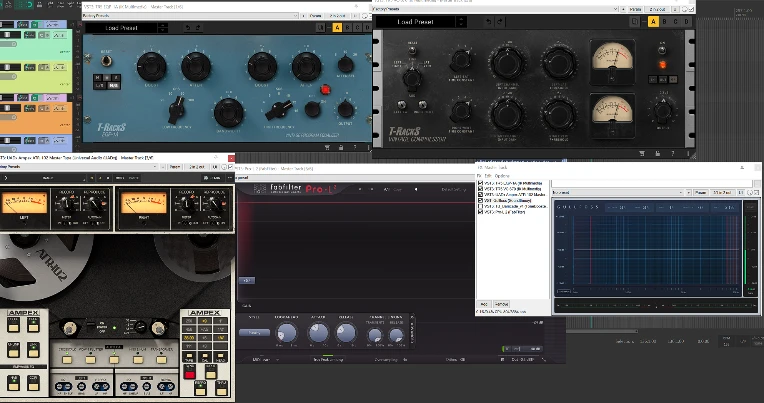
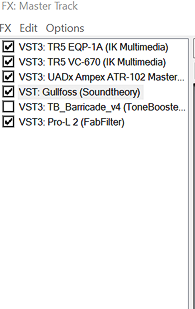
Besides, I use Match EQ, ProQ4's 'spectral band' mode and Gullfoss to get my mixes to translate better on other audio setups.


BBS Signature

This is the mix buss chain for Horrora Borealis

iu_1503483_3945050.webp

iu_1503484_3945050.png


BBS Signature

Response to How do you master your tracks? 2025-12-07 22:03:41


At 12/7/25 01:45 AM, StainsThatStay wrote:For a long time I've used dual multi-band compressors on most of my tracks.
(1st is usually neutral at 0db with the second in the chain lowered to anywhere from -2db to -6db)

For fine tuning I'll use a parametric EQ in-between the two or at the end of the chain if I feel the need.

I am very curious to hear how others go about this process since I don't really pay too much attention to my mastering
at this point lol.
Perhaps I may learn something new?



Easy:

Cramit

Ozone 10 Vintage Limiter

FabFilter - Pro-Q 3


That's enough for me for many genres. I can also use Ozone 10 Imager and Stabilizer sometimes.

Response to How do you master your tracks? 2025-12-07 22:05:43


At 12/7/25 10:44 AM, 4ttitude wrote:I'm one of those who tends to have my mastering plugins active from the beginning so I know exactly what the end result will sound like the entire time.. Maximus does a lot of the heavy-lifting for me and I don't do anything too special; I'll try to ensure the bass is comparatively loud and the highs are comparatively quiet, that it's all as loud as it can be without destroying the dynamic range, and I've taken to setting the ceiling to -1dB for post-processing on sites and streaming services.


I thought I was the only one! I actually created my own universal mastering preset, which usually works perfectly without changes.

I can also turn off the master effects to monitor the mix for errors and oddities, so that I can immediately understand exactly where to work on the mix.

Response to How do you master your tracks? 2025-12-08 00:15:07


I always put Ozone first in the master track, just so I can see if there's any extreme frequencies that stick out. Especially sub bass etc. since my speakers don't go that low. I usually don't touch the EQ at all though unless needed. Then I put that into a compressor and then that into a limiter. That's about it. Then I have the Ozone Stereo Imager at the end too. But both the Ozone plugins are mainly for visualization during the mixing. Most of the stuff I do is in the mix phase, the mastering part isn't that extravagant and they tend to blend together.


Soft Clipper, EQ, Imager, Compressor, Multiband Compressor, Limiter, usually in that order. Sometimes ill add other stuff but ultimately the key is getting as good of a sounding mix as possible before you put anything on the master. I try to avoid presets because the EQ and Compression settings should be a bit different for each track.

Response to How do you master your tracks? 2025-12-09 23:38:37


Every single "instrument" (for some definition of instrument): its own EQ and compression, to taste.


Divide instruments into groups: melodic instruments, percussive instruments, misc audio sources. Route them to their own mixing busses: EQ and multiband compression to taste.


Route all group mixing busses to master mixing buss: EQ and multiband compression to taste.


The end!


BBS Signature

Response to How do you master your tracks? 2025-12-11 07:29:04


Thanks to all who have shared and those who have yet to. This has been very insightful!

Response to How do you master your tracks? 2025-12-11 12:16:34


6 OTTs and a sausage fattener cranked to 100%

Response to How do you master your tracks? 2025-12-14 09:48:29


hard clipper, raise volume until it distorts too much, then dial it back a little bit

Response to How do you master your tracks? 2025-12-17 19:18:20


I, being the barbarian (I guess) that I am, don'tiu_1508163_25986335.webp


BBS Signature

Response to How do you master your tracks? 2025-12-17 20:18:53


Honestly I don't even know how to use mastering on BandLab xD


BBS Signature

My process has been the same for a while now.


Here's my typical effect chain on most synths:


EQ < Compression < Multiband < Effects (Reverb, Delay, Saturation, Stereo) < Sidechain compression < Limiter (Limiter is only set to -.8dbs simply to avoid clipping)


I then bounce all tracks to audio clips within the project, excluding the sidechain compressors and limiter, then clean up tails, and whatnot.


Then I mix it all down at 48000hz, 16bit, with -5 to -6dbs of headroom, and I use Ozone to master.


In Ozone, I typically only limit to about -8 db, (as that's the limit I had set within the track) and push the threshold to like -3.5db, or as far as I can get before it redlines.


I then EQ, cutting out everything below 30 hz, and everything above 18000hz give or take for clarity, and bump up the high-mids and the 80 to 120hz range slightly.


As for dynamics, I just play with it until it sounds good tbh.


BBS Signature

Response to How do you master your tracks? 2025-12-19 16:54:29


At 12/11/25 12:16 PM, porksausages wrote:6 OTTs and a sausage fattener cranked to 100%


lmaooooo


I've got Two (two) Phones (Phones)

BBS Signature

Response to How do you master your tracks? 2025-12-19 23:44:15


At 12/19/25 01:15 PM, DetiousMusic wrote:My process has been the same for a while now.

Here's my typical effect chain on most synths:

EQ < Compression < Multiband < Effects (Reverb, Delay, Saturation, Stereo) < Sidechain compression < Limiter (Limiter is only set to -.8dbs simply to avoid clipping)

I then bounce all tracks to audio clips within the project, excluding the sidechain compressors and limiter, then clean up tails, and whatnot.

Then I mix it all down at 48000hz, 16bit, with -5 to -6dbs of headroom, and I use Ozone to master.

In Ozone, I typically only limit to about -8 db, (as that's the limit I had set within the track) and push the threshold to like -3.5db, or as far as I can get before it redlines.

I then EQ, cutting out everything below 30 hz, and everything above 18000hz give or take for clarity, and bump up the high-mids and the 80 to 120hz range slightly.

As for dynamics, I just play with it until it sounds good tbh.


Quick question, why do you cut out the sub 30hz? Your mixes sound really good, so no complaints on your work, but wouldn't that hurt the sub bass? I can't judge since I run Yamaha HS5 and can't hear it anyway, but from my understanding, not having a HPF on kick and bass (generally) keeps the sub clean and helps make the overall mix fatter.


At 12/19/25 11:44 PM, DantesGrill wrote:
At 12/19/25 01:15 PM, DetiousMusic wrote:My process has been the same for a while now.

Here's my typical effect chain on most synths:

EQ < Compression < Multiband < Effects (Reverb, Delay, Saturation, Stereo) < Sidechain compression < Limiter (Limiter is only set to -.8dbs simply to avoid clipping)

I then bounce all tracks to audio clips within the project, excluding the sidechain compressors and limiter, then clean up tails, and whatnot.

Then I mix it all down at 48000hz, 16bit, with -5 to -6dbs of headroom, and I use Ozone to master.

In Ozone, I typically only limit to about -8 db, (as that's the limit I had set within the track) and push the threshold to like -3.5db, or as far as I can get before it redlines.

I then EQ, cutting out everything below 30 hz, and everything above 18000hz give or take for clarity, and bump up the high-mids and the 80 to 120hz range slightly.

As for dynamics, I just play with it until it sounds good tbh.

Quick question, why do you cut out the sub 30hz? Your mixes sound really good, so no complaints on your work, but wouldn't that hurt the sub bass? I can't judge since I run Yamaha HS5 and can't hear it anyway, but from my understanding, not having a HPF on kick and bass (generally) keeps the sub clean and helps make the overall mix fatter.


From my understanding, and I could be wrong, as this is something I picked up years ago—but most sound systems, and the human ear can’t hear frequencies that low. So it just ends up being unnecessary ‘mud’. I thinks this applies mainly for EDM, whereas you might not do this for cinematic pieces, or metal. But I’m kinda talking out of my ass now. xD


I also remember this being a hot topic throughout the years, as some producers swear by it, and others hate it.


BBS Signature

Response to How do you master your tracks? 2025-12-20 11:48:33


At 12/20/25 04:09 AM, DetiousMusic wrote:
At 12/19/25 11:44 PM, DantesGrill wrote:
At 12/19/25 01:15 PM, DetiousMusic wrote:My process has been the same for a while now.

Here's my typical effect chain on most synths:

EQ < Compression < Multiband < Effects (Reverb, Delay, Saturation, Stereo) < Sidechain compression < Limiter (Limiter is only set to -.8dbs simply to avoid clipping)

I then bounce all tracks to audio clips within the project, excluding the sidechain compressors and limiter, then clean up tails, and whatnot.

Then I mix it all down at 48000hz, 16bit, with -5 to -6dbs of headroom, and I use Ozone to master.

In Ozone, I typically only limit to about -8 db, (as that's the limit I had set within the track) and push the threshold to like -3.5db, or as far as I can get before it redlines.

I then EQ, cutting out everything below 30 hz, and everything above 18000hz give or take for clarity, and bump up the high-mids and the 80 to 120hz range slightly.

As for dynamics, I just play with it until it sounds good tbh.

Quick question, why do you cut out the sub 30hz? Your mixes sound really good, so no complaints on your work, but wouldn't that hurt the sub bass? I can't judge since I run Yamaha HS5 and can't hear it anyway, but from my understanding, not having a HPF on kick and bass (generally) keeps the sub clean and helps make the overall mix fatter.

From my understanding, and I could be wrong, as this is something I picked up years ago—but most sound systems, and the human ear can’t hear frequencies that low. So it just ends up being unnecessary ‘mud’. I thinks this applies mainly for EDM, whereas you might not do this for cinematic pieces, or metal. But I’m kinda talking out of my ass now. xD

I also remember this being a hot topic throughout the years, as some producers swear by it, and others hate it.


Ah, I see. I get it. I actually thought it would be the opposite for EDM and metal, keeping the sub to maintain that low punch of the subs when the kick hits, and keeping the lows clean for metal in order to keep the mids more prominent.


It's something I've heard about with guitars though, playing with headphones isn't the same as playing with speakers. With headphones you move sound, with speakers you move air, and that's what gives the feeling. That's why I was curious, since you still move air even if you can't hear it. I wonder how much it affects the "cleanliness" of the lows though, or if you can even feel a difference with or without HPF.


i just use maximus's clear master at 60% and call it a day

Response to How do you master your tracks? 2025-12-29 05:30:46


tbh I mostly just leave the default fl limiter on and pray.


BBS Signature

Response to How do you master your tracks? 2025-12-29 22:49:22


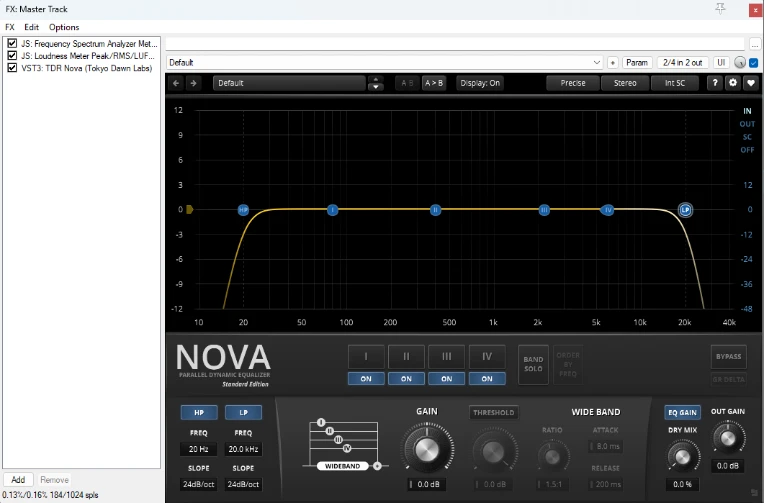
i have an eq boosting the high frequencies, it looks like a slanted line all the way through on the graph. i then have a glue comp. for peaks, multiband comp. and limiter


it really depends on the song

my latest track A Dark Place (shameless selfpromo) is just an eq with a high pass on 20 and a low pass on 20k


iu_1514898_15122047.webp


didn't use a limiter or a clipper on this one

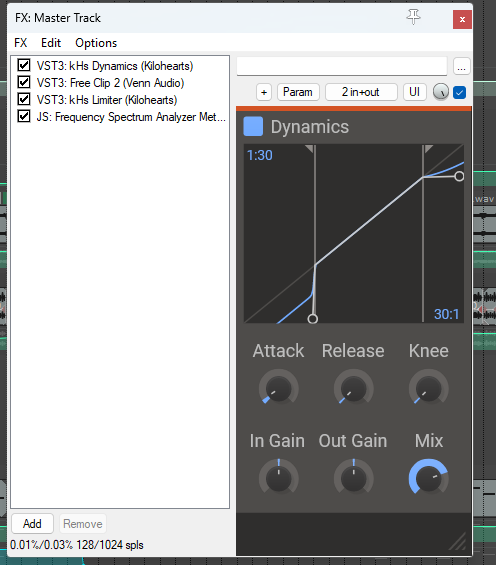
but in most of them i just use a clipper and a limiter, sometimes a dynamics plugin, like here in BL72


iu_1514899_15122047.png


i usually apply eqs and other effects on the individual tracks

but in general its just that, dynamics, clipper at -0.5 and limiter at -0.75 or -1

Response to How do you master your tracks? 2026-01-01 20:01:41


At 12/7/25 01:45 AM, StainsThatStay wrote:For a long time I've used dual multi-band compressors on most of my tracks.
(1st is usually neutral at 0db with the second in the chain lowered to anywhere from -2db to -6db)

For fine tuning I'll use a parametric EQ in-between the two or at the end of the chain if I feel the need.

I am very curious to hear how others go about this process since I don't really pay too much attention to my mastering
at this point lol.
Perhaps I may learn something new?

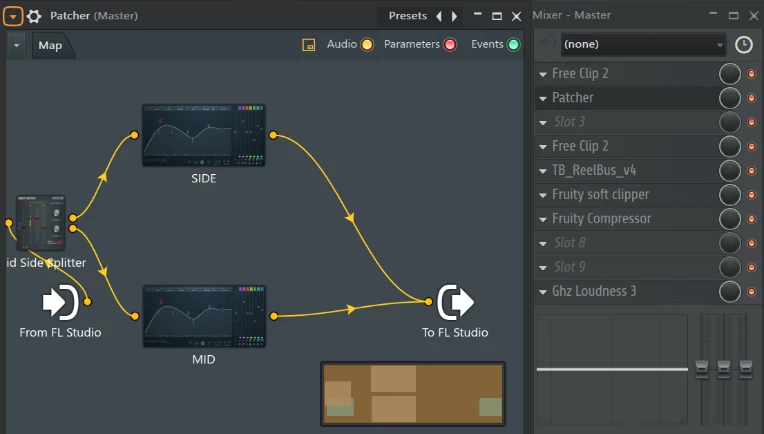
I tend to make a separate FLP file to master stuff, I'm not very knowledgeable of the mastering process so my master bus usually looks, top to bottom, like:


Clipper for annoying peaks (so, not quite to add color) -> EQ -> Old-School Compressor or a regular one


There isn't much, I haven't ventured into stereo tools and other stuff people have mentioned, but here's an example picture of an unreleased track:


iu_1516989_10767901.webp

Response to How do you master your tracks? 2026-01-13 22:45:11


At 12/7/25 01:45 AM, StainsThatStay wrote:For a long time I've used dual multi-band compressors on most of my tracks.
(1st is usually neutral at 0db with the second in the chain lowered to anywhere from -2db to -6db)

For fine tuning I'll use a parametric EQ in-between the two or at the end of the chain if I feel the need.

I am very curious to hear how others go about this process since I don't really pay too much attention to my mastering
at this point lol.
Perhaps I may learn something new?

Mastering is both easy and hard depending on the material, if its your song then you can really fix most of the issues on the mix part since thats where a lot of the final sound comes from, mastering is just the last step when it comes to finishing your track and be ready for release. It's mainly a polishing step.


A good starting chain begins with


  • Corrective EQ: You don't really want to boost anything but its mainly fix glaring issues with the song like if the whole song feels a bit muddy or too bass or too bright, so you use an EQ preferably digital like linear phase, Pro-Q3 for example or any other linear phase EQ


  • Compression / Dynamic Control: Mainly to catch small peaks in your audio, and to "glue" everything together, as this will make all of the sounds in your song not sound too disconnected from one and other, usually a multiband compressor like 4 bands is a good start so Pro-MB or Ozone Dynamics Module or if you don't feel like it then a mastering compressor like Kotelnikov TDR like just a single band to catch all the spectrum, its just so it sounds glued together


  • Additive EQ / Colorization: This part can be easily messed up but so the others, mainly it's for sculping as if you are pushing for a certain frequency balance, as in if you want it more bassy or more airy or bright, or maybe more mid heavy, it's up to you, you can add an analog emulation of an EQ or just a regular digital EQ or a saturation plugin like even CHOW Tape works wondefully for this, it's mainly to add a bit of flavor, just don't over do it


  • Limiter / Clipper: The final step, mainly so you can push the loudness of the track and maximize it, obviously it's up to you depending on your target. -14 LUFS? sure why not? -5? If you are able to get it sounding that loud without sounding bad then that works. A clipper would get you louder but even then it depends on the genre and what you do, you wouldnt put a clipper if you were making jazz lmfao


  • Dither (if you are exporting to 16bit wav): A bit hard to explain but the limiter has this, then it should be good, but its mainly to fix the issues with the SnH process of digital audio, when it comes to lowering the bit depth, it just adds a bit of noise to the sound to fix those quantization issues. This only applies if you are exporting to 16bit, 24 and 32 don't get affected by it.


And that's it!! That's quite much of what i learned during studying but dont assume this as an absolute truth :p even then im probably wrong in some parts but overall, this is my process nowdays in my newer projects and well now using reference tracks with Tonal Balance 2 Izotope, good tool for referencing, well anyways..........


BBS Signature

Response to How do you master your tracks? 2026-01-14 13:31:36


There is so much mastering BS out there. People have their favorite effects chains and whatnot but I'm going to raise the argument that having a default process and pre-planned steps is not useful in mastering. Every track has different needs, and unless all of your music sounds basically the same going into that mastering chain, you're not going to be correcting anything in the mastering stage with this strategy.


Before you load up a single mastering plugin, think about specific qualities of the sound you want to change. For instance, maybe the sound is...

  • Too wide and unfocused. You'd load something to modify the stereo field, like a mid-side EQ.
  • Losing the hihats and shakers. You might pick a multiband upwards compressor to single out the high frequencies and bring up the little details.
  • Too dark. You might brighten the sound with EQ, an exciter, or a multiband compressor.
  • Peaking too high. You might use a clipper or limiter to bring down the peaks.
  • Too cluttered. You might use a mid-side EQ to single out certain elements and emphasize some over others. Alternatively you might revisit the mix.


Loading up a preset mastering chain is lazy. Mastering is the last step in the process to add polish and fix up any minute things; you don't want to mentally check out at the very end.


Make sure that you can articulate what you want to change and why. Mixing and mastering is just as much a creative art form as composition and production!


Thanks for listening! :)

BBS Signature